

Transforming Your SaaS Help Center into an SEO Powerhouse
When I first stepped into the world of SaaS product support, I treated the help center like a static FAQ sheet—a place where users could stumble upon answers after a frantic search. Over time, I realized that this repository was an untapped SEO goldmine, sitting quietly on the sidelines while competitors were racing to rank for the very questions our users were asking. In this post, I’ll walk you through a step‑by‑step framework that turns a humble knowledge base into a traffic‑generating, conversion‑boosting engine. The goal isn’t just to attract clicks; it’s to nurture prospects, shorten the sales cycle, and reinforce brand authority—all while keeping the user experience delightfully frictionless.
Why the Help Center Deserves a Seat at the SEO Table
Most SaaS marketers focus on blog posts, product pages, and landing pages for SEO. The help center, however, has three distinct advantages that make it an ideal SEO asset:
- High intent queries: Users searching for “how to integrate X with Y” or “error code 403 in your app” are already in the problem‑solving mindset, which translates to higher conversion potential.
- Rich, evergreen content: Technical documentation tends to stay relevant longer than trend‑driven blog topics, giving you lasting search visibility.
- Built‑in authority: Search engines love content that demonstrates expertise, and a well‑structured help center signals that your product truly knows its own intricacies.
Think of the help center as a quiet, diligent sales rep who works 24/7, answering questions that would otherwise land in a support ticket queue. When optimized correctly, it can also serve as a strategic funnel, guiding visitors from curiosity to a qualified lead.
Audit Your Existing Knowledge Base – The Foundation of Success
Before you start sprinkling keywords or adding schema, you need a clear snapshot of where you stand. Here’s the audit checklist I use for every SaaS product I work with:
- Content inventory: Export all articles, their URLs, and metadata into a spreadsheet. Tools like Screaming Frog or Sitebulb can automate this step.
- Search intent mapping: For each article, identify the primary user intent (informational, transactional, navigational). This helps you prioritize which pages need SEO focus.
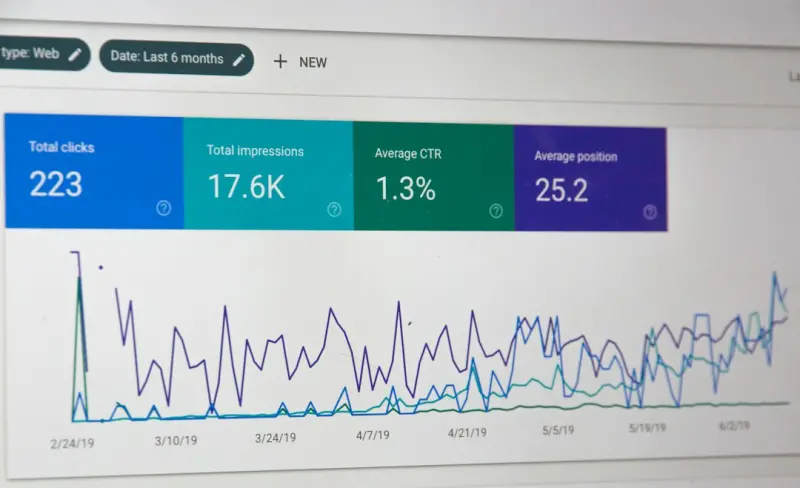
- Performance metrics: Pull organic impressions, click‑through rates, and average positions from Google Search Console. Flag any high‑impression pages with low clicks—there’s likely a meta tag issue.
- Duplicate content detection: Look for near‑identical articles (e.g., “How to reset password” vs. “Password reset guide”). Consolidate or canonicalize them to avoid dilution.
- Technical health check: Verify that each article returns a 200 status, has a logical URL structure, and loads quickly (under 2 seconds).
Completing this audit not only surfaces quick wins but also prevents you from building on a shaky foundation. Once you have clarity, you can apply targeted SEO tactics with confidence.
Keyword Research Reimagined: From FAQs to Search‑Friendly Topics
Traditional keyword tools are great for blog topics, but help center content requires a slightly different lens. Start by mining three primary sources:
- Support ticket data: Export common questions from your ticketing system. Phrases users type into support chats often reflect their natural search language.
- Community forums & social listening: Platforms like Reddit, Stack Overflow, or even your own user community reveal the exact terminology prospects use.
- Search console query reports: Identify queries that already land on your help articles—even if they’re on the second or third page of results.
After gathering this raw data, cluster the queries into thematic groups and prioritize them based on search volume, relevance, and difficulty. Then, craft a topic map that aligns each cluster with an existing article or a new content piece you’ll develop.
On‑Page Optimization for Technical Articles
Now that you have the right keywords, it’s time to embed them thoughtfully. Here are the on‑page elements that matter most for help center SEO:
- Title tag (≤ 60 characters): Include the primary keyword near the beginning, followed by your brand. Example: “Integrate Slack with XYZ SaaS – Step‑by‑Step Guide”.
- Meta description (≤ 160 characters): Summarize the article’s solution and incorporate a call‑to‑action, such as “Learn how to set up the integration in under five minutes.”
- Header hierarchy: Use one
<h1>(usually the article title) and subsequent<h2>and<h3>tags for sections like “Prerequisites”, “Step 1”, “Troubleshooting”. This improves readability for both users and crawlers. - Keyword placement: Sprinkle the primary keyword in the first 100 words, in at least one sub‑heading, and naturally throughout the body. Avoid keyword stuffing—search engines reward relevance, not repetition.
- Rich media: Include screenshots, short GIFs, or embedded videos. Add descriptive
altattributes that contain relevant keywords. - Internal linking: Connect related articles using descriptive anchor text. This creates a web of authority and helps crawlers discover deeper content.
For a deeper dive into internal linking best practices, see my earlier piece on SEO strategies that drive SaaS adoption. While that post covers the broader strategy, the same principles apply within your knowledge base.
Schema Markup: Making Search Engines Understand Your Content
One of the most underutilized SEO tools for SaaS help centers is structured data. By adding FAQPage or HowTo schema, you can surface your articles as rich snippets, increasing click‑through rates dramatically. Here’s a quick implementation guide:
- Identify the right schema type: Use
FAQPagefor question‑answer style articles andHowTofor step‑by‑step guides. - Generate JSON‑LD: Most modern CMS platforms let you inject JSON‑LD via a custom field. If you’re on a headless CMS, include the script in the article template.
- Validate with Google’s Rich Results Test: Before publishing, ensure your markup passes validation to avoid penalties.
- Monitor performance: In Search Console, track “Enhancements” to see impressions and clicks from rich results.
If you’re looking for a broader discussion on why structured data matters for B2B SaaS SEO, check out Why Structured Data Is the Secret Weapon for B2B SaaS SEO. The concepts translate directly to help center pages.
Leveraging User‑Generated Content: Community Answers as SEO Assets
Many SaaS platforms host community forums or allow users to submit comments on help articles. Turning these contributions into SEO‑friendly content can double your content output without additional writer hours. Here’s how:
- Moderate and curate: Identify high‑quality user answers that resolve specific problems. Edit for clarity and add relevant internal links.
- Convert to Q&A format: Structure the content as a question followed by the best community answer, then tag it with
FAQPageschema. - Reward contributors: Offer badges or recognition. This incentivizes more users to share knowledge, enriching your SEO pool.
- Track performance: Use UTM parameters on internal links to see which community‑generated pages drive the most traffic or sign‑ups.
This approach not only expands your keyword footprint but also builds trust—prospects see real users solving real problems, which can accelerate the decision‑making process.
Measuring Success: KPIs That Matter for Help Center SEO
Traditional SEO metrics like organic traffic and keyword rankings are still important, but for a help center, you should also monitor:
- Help‑center organic sessions: Number of visits arriving from search.
- Resolution rate from organic traffic: Percentage of users who find a solution without creating a support ticket.
- Time on page vs. bounce rate: Higher engagement signals relevance to search engines.
- Lead generation: If you embed CTA forms (e.g., “Request a demo”) within articles, track conversions.
- Support ticket deflection: Compare ticket volume before and after SEO improvements.
Set up a dashboard in Google Data Studio or your preferred analytics platform to visualize these metrics. Over time, you’ll see how each SEO tweak translates into tangible support and revenue outcomes.
Scaling the Process: Making SEO a Continuous Part of Product Development
To keep the help center fresh and SEO‑friendly, integrate content updates into your product roadmap. Here’s a practical workflow:
- Feature rollout meeting: As soon as a new feature is slated for release, assign a content owner to draft the corresponding help article.
- SEO brief creation: The SEO lead supplies a brief with target keywords, suggested schema, and internal linking recommendations.
- Draft review: Technical writers produce the article; product managers verify technical accuracy.
- SEO audit checklist: Before publishing, run the article through the on‑page checklist and structured data validator.
- Post‑launch monitoring: After release, monitor search performance for the first 30 days and adjust meta tags or internal links as needed.
Embedding SEO into the development lifecycle ensures that every new piece of functionality gets an SEO‑optimized knowledge asset from day one, eliminating the backlog of “orphaned” articles that never rank.
Future‑Proofing: Preparing for AI‑Driven Search
Search is evolving beyond keyword matching toward intent and conversational understanding. Large language models (LLMs) are already powering “search‑as‑you‑type” experiences in many SaaS platforms. To stay ahead:
- Write for natural language: Structure content around full‑question phrases (“How do I export data from XYZ?”) rather than isolated keywords.
- Provide concise answers: LLMs love succinct, factual responses—use bullet points and short paragraphs for key steps.
- Maintain up‑to‑date data: AI models pull from recent content; stale articles may be deprioritized. Implement a regular audit cadence.
- Offer API access to knowledge base: Some AI assistants can query your help center directly if you expose a well‑documented endpoint.
By aligning your help center with the direction of AI‑driven search, you ensure that your SaaS product remains discoverable in the next generation of search experiences.
Wrap‑Up: Turning Knowledge into Growth
Optimizing a SaaS help center for SEO isn’t a one‑off project; it’s a strategic, ongoing initiative that bridges product support, marketing, and engineering. When executed correctly, it delivers three core benefits:
- Increased organic visibility: Rank for high‑intent queries that your competitors may overlook.
- Reduced support costs: More users find answers on their own, freeing your support team for complex issues.
- Accelerated revenue: Organic visitors who find helpful content are more likely to convert into paying customers.
Start with a thorough audit, align your keyword research with real user questions, and embed SEO best practices into every piece of documentation. The payoff is a help center that not only serves your existing users but also becomes a powerful acquisition channel—quietly working behind the scenes to grow your SaaS business.

Margaret Thomson is a seasoned freelance writer specializing in the dynamic worlds of marketing and advertising. With a career deeply rooted in the marketing field, Margaret brings a wealth of practical experience and insightful knowledge to her writing.
Related Posts

Zero‑Click Search Dominance: How SaaS Brands Capture Visibility Without Clicks
Zero‑click search is reshaping how SaaS brands win visibility. This guide walks you through semant... Read More

Prompt‑First SEO: How Generative AI Is Rewriting the Rules of Search
A deep dive into the emerging “prompt‑first” SEO approach, showing how generative AI changes q... Read More

Why Semantic SEO Is the Quiet Engine Driving B2B SaaS Visibility
Semantic SEO moves beyond keywords to map user intent, structured data, and AI insights, giving B2B ... Read More
Top Posts

Unlocking Personal Growth in the Gaps Between Flights
Learn to transform idle travel moments into powerful personal‑development sessions with microlearning, data‑driven planning, sensory hacks, and AI‑assiste...Read More

The Quiet Revolution: AI as the Ethical Compass for SaaS
A deep dive into why AI should serve as an ethical compass for SaaS firms, outlining a practical five‑step framework, cultural levers, and measurable KPIs to ...Read More
The Untapped Power of Structured Data for SaaS Landing Pages
Structured data is a game‑changer for SaaS landing pages. Discover practical implementations of product, FAQ, and review schema, and a 30‑day action plan to...Read More

AI‑Augmented Customer Success: The Next Competitive Edge for SaaS
AI is shifting customer success from reactive support to proactive delight. Learn how predictive churn alerts, dynamic playbooks, and knowledge graphs empower S...Read More
0 Comments
Post Comment
You will need to Login or Register to comment on this post!