
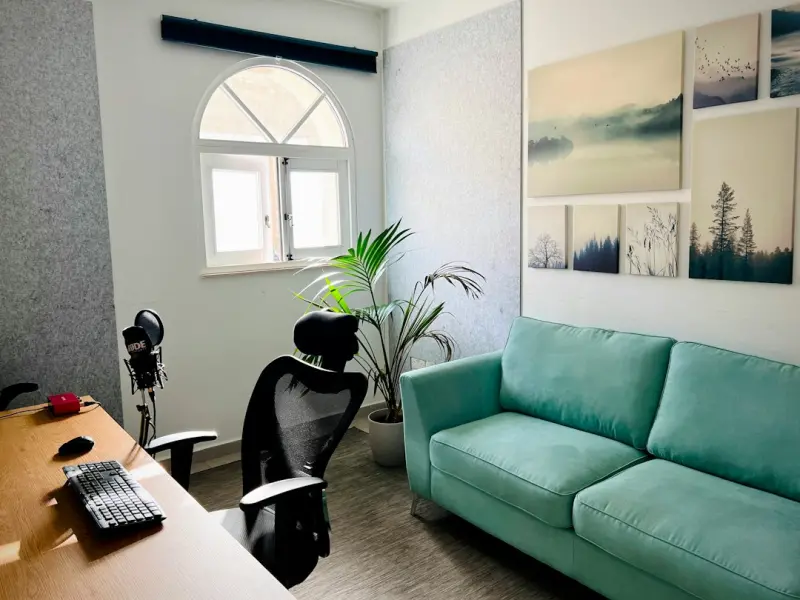
When the kitchen table becomes a conference desk and the living‑room couch doubles as a brainstorming lounge, the line between home and office blurs. I’ve spent the last few years hopping between city apartments, suburban houses, and a tiny mountain cabin, all while trying to keep my work life from invading my personal sanctuary. The result? A set of hard‑earned, down‑to‑earth tactics that turn any dwelling into a remote‑work oasis—no matter the square footage or budget.
1. Map Your Zones Before You Move Anything
Before you start shuffling furniture, take a step back and draw a simple floor plan on a napkin or a phone app. Identify three core zones: focus, break, and support. The focus zone is where you’ll do the deep work; the break zone is a dedicated spot for short, restorative pauses; and the support zone houses everything that keeps the other two running smoothly—think chargers, printer, and a small shelf for reference material.
By visualizing these zones, you prevent the common mistake of “working everywhere,” which quickly erodes mental stamina. The layout doesn’t have to be perfect; it just needs to give each activity its own physical cue.
2. Light Is Your Silent Partner
Natural daylight is the most potent productivity booster you can harness without spending a dime. Position your main work desk near a window, but make sure the screen isn’t directly behind you to avoid glare. If daylight is scarce, invest in a daylight‑mimicking LED lamp. Aim for a color temperature around 5,000‑6,500 K—this mimics the sun’s blue‑rich spectrum and helps keep your circadian rhythm on track.
Tip: Install a dimmable smart plug for the lamp so you can easily lower the intensity during late‑night sessions, protecting your eyes and preserving sleep quality.
3. Sound Management Without a Soundproof Booth
Noise is the silent productivity killer, especially if you share walls with a bustling street or a noisy family member. A few inexpensive tricks can create an acoustic bubble:
- Soft furnishings: A plush rug, heavy curtains, and fabric‑covered chairs absorb sound waves.
- White‑noise devices: A simple fan or a white‑noise app can mask distracting background chatter.
- DIY panels: Hang canvas frames with acoustic foam or even thick blankets on the wall behind your screen.
These solutions cost less than a single coffee‑shop subscription but dramatically improve focus.
4. Ergonomics That Don’t Require a Gym Membership
Spending hours hunched over a laptop can lead to neck strain, back pain, and decreased productivity. Here’s a low‑cost ergonomic checklist:
- Screen height: The top of your monitor should sit at eye level. Stack books or use a sturdy laptop riser if needed.
- Keyboard and mouse placement: Keep elbows at a 90‑degree angle; a small wrist pad can help maintain a neutral wrist posture.
- Chair support: If an ergonomic chair is out of reach, add a lumbar pillow or a rolled towel to the lower back.
- Movement breaks: Set a timer to stand, stretch, or walk for two minutes every hour. This micro‑movement habit keeps blood flowing and reduces fatigue.
5. Declutter With Purpose
Clutter isn’t just a visual nuisance; it creates mental noise that hampers decision‑making. Adopt a “one‑in, one‑out” rule: for every new gadget or décor item you bring in, remove an existing one. Use transparent bins for supplies, and label them clearly. The visual clarity of a tidy workspace translates directly into a clearer mind.
6. Personalize, But Keep It Minimal
A sterile desk can feel uninviting, yet over‑decorating can become a distraction. Choose a handful of items that inspire you—a small plant, a framed photo, or a piece of art that sparks creativity. Plants are especially powerful: they improve air quality and have been shown to reduce stress levels. A low‑maintenance succulent or a pothos vine works well even for the most forgetful caretakers.
7. Smart Storage Hacks for Small Spaces
If you’re working from a studio apartment or a shared room, vertical space becomes your best friend. Install floating shelves above your desk to keep notebooks, chargers, and decorative pieces off the work surface. Use under‑desk drawers or rolling carts that can be tucked away when not in use. A simple pegboard on the wall can hold headphones, cables, and even a small whiteboard for quick brainstorming.
8. Create a “Leave‑Work” Ritual
One of the biggest challenges of remote work is the mental bleed‑over from office to home life. Design a daily ritual that signals the end of the workday: shut down your computer, dim the lights, and move to a different room for a short activity—stretching, reading a page of a novel, or preparing a healthy snack. This physical and mental transition helps you unwind and protects your personal time.
9. Leverage Technology Wisely
Not every new app or gadget adds value. Choose tools that truly streamline your workflow. For instance, a single‑screen capture app can replace the endless back‑and‑forth of screenshot sharing, while a task‑management board keeps projects organized without cluttering your email inbox. When you’re curious about how emerging tech reshapes business, you can explore technology trends shaping business for a broader perspective.
10. Foster a Community, Even at Home
Isolation can erode motivation. Create a micro‑network of fellow remote workers—neighbors, local coffee‑shop regulars, or online cohorts. Schedule a weekly virtual coffee break or a rotating “show‑and‑tell” session where each person shares a productivity tip or a hobby. Building these connections can spark fresh ideas and keep morale high. If you’re interested in the power of niche online groups, reading about niche online communities can give you a deeper appreciation of collective energy.
11. Budget‑Friendly Upgrades That Pay Off
While you don’t need a high‑end office suite, a few strategic investments can yield big returns:
- Quality headset: Clear audio for calls and built‑in noise cancellation reduce background distractions.
- Portable monitor: Extends screen real estate without a permanent desk overhaul.
- Desk organizer set: Keeps pens, sticky notes, and cables neatly sorted.
These items typically cost less than a monthly subscription to a co‑working space, yet they dramatically improve your daily workflow.
12. Seasonal Adjustments for Comfort
Don’t let the seasons dictate your productivity. In winter, add a portable heater or a heated blanket for your chair. In summer, a small fan or a window screen can keep the space breezy. Adjust lighting to match natural daylight patterns: brighter, cooler light in the morning for alertness; warmer, softer light in the evening to wind down.
13. Keep an Eye on Energy Consumption
Running multiple devices can inflate your electricity bill. Use smart power strips that cut power to idle equipment, and enable energy‑saving modes on computers and monitors. This not only saves money but also aligns your home office with sustainable practices—something many of us appreciate without shouting about it.
14. The Power of a Dedicated “Idea” Spot
Beyond the focus zone, carve out a small corner for free‑thinking. A low table with a stack of blank notecards, a sketchpad, and a colored pen set invites spontaneous brainstorming. When you need to break out of a mental block, step away from the screen and let your thoughts flow onto paper. This tactile interaction can surface ideas that a digital note‑taking app might miss.
15. Review and Refine Monthly
Finally, treat your home‑office setup as a living system. At the end of each month, spend ten minutes reviewing what worked and what didn’t. Did you find the lighting adequate? Were the noise‑reduction methods effective? Adjust your layout, tools, or routines based on these insights. Continuous refinement ensures your space evolves with your changing needs.
By blending intentional design, mindful habits, and a dash of creativity, you can transform even the most modest living area into a hub of focus, comfort, and inspiration. The goal isn’t to recreate a corporate office—it’s to craft a space that feels personal, energizing, and uniquely yours.

Sanji Patel has dedicated 25 years to the SEO industry. As an expert SEO consultant for news publishers, he emphasizes providing both technical and editorial SEO services to news publishers worldwide. He frequently speaks at conferences and events globally and offers annual guest lectures at local universities.
Related Posts

Seasonal Home Reset: How to Seamlessly Transition Your Space Every Few Months
Learn a practical, four‑phase approach to seasonally refresh your home, from spring decluttering t... Read More

The 5‑Minute Home Maintenance Blueprint That Saves Time and Money
Learn how a handful of five‑minute daily tasks can transform your home’s upkeep, reduce costly r... Read More

Bring the Outdoors In: Biophilic Hacks to Boost Your Home’s Energy and Mood
Explore practical biophilic design tips that transform any home into a calming, energy‑efficient s... Read More
Top Posts

Interactive Newsletters: The New Frontier for B2B SaaS Marketers
Interactive newsletters turn static inboxes into dynamic sales tools, using polls, videos, and AI-driven personalization to increase engagement and generate qua...Read More

Conversational Commerce: Turning Dialogue into B2B Growth
A deep dive into why real‑time conversational channels are the missing link for B2B marketers, offering actionable steps to turn chat into a growth engine....Read More

AI-Driven Compliance: Turning Regulation into a Competitive Edge
AI can shift compliance from a manual, reactive task to a strategic advantage, automating risk detection, integrating with existing SaaS toolchains, and even al...Read More

Seasonal Home Reset: Refresh Your Space Without a Full Renovation
Discover a practical seasonal reset guide that uses light, color, scent, and smart tweaks to transform your home’s atmosphere, boost well‑being, and avoid c...Read More
0 Comments
Post Comment
You will need to Login or Register to comment on this post!