

Why SaaS Knowledge Bases Are the Unsung SEO Heroes
When most B2B SaaS marketers think about SEO, the mind instantly drifts to landing pages, blog posts, and backlink campaigns. Rarely does the conversation shift to the help center or knowledge base. Yet these repositories of product‑specific content sit on the front line of every customer’s journey, answering questions that Google’s crawlers love to surface.
In my experience, a well‑engineered documentation site can become an organic traffic engine that not only reduces support costs but also builds domain authority in a way traditional marketing assets simply cannot. The trick is to treat the knowledge base as a first‑class SEO property from day one—designing its architecture, content, and technical markup with search engines in mind.
Understanding Search Engines’ Appetite for Structured Help Content
Google’s algorithms have evolved far beyond simple keyword matching. The search engine now evaluates how well a page satisfies a user’s intent and rewards content that demonstrates expertise, authority, and trust (E‑A‑T). Help documentation, by definition, is purpose‑built to answer specific user queries with precision and clarity. This aligns perfectly with Google’s “answer‑first” mindset.
Furthermore, Google’s FAQ and How‑To schema gives a direct pathway for knowledge base articles to appear in rich results. When a prospect searches for “how to reset my API key in Product X,” a properly structured FAQ can appear at the very top of the SERP, stealing the click from generic blog posts.
Building an SEO‑First Documentation Strategy
Most SaaS companies treat documentation as an afterthought, dumping it into a sub‑domain or a siloed CMS after the product ships. That approach creates a cascade of SEO problems: orphaned pages, thin content, and slow loading times that hurt rankings. Below is a step‑by‑step framework that flips the script.
- Define Core User Journeys. Map the most common support tickets, feature requests, and onboarding milestones. Each journey becomes a pillar topic for your knowledge base.
- Keyword Research for Questions. Use tools like AnswerThePublic, SEMrush’s “Keyword Magic,” or even your own ticket logs to discover the exact phrasing users employ.
- Topic Clustering. Group related questions under a single “cluster” page (e.g., “API Authentication”). The cluster page serves as a hub, linking out to detailed answers and collecting inbound links.
- Content Templates. Standardize headings, call‑to‑action (CTA) placement, and schema implementation across all articles to maintain consistency and scalability.
Technical Foundations: Schema, Crawlability, and Performance
Even the best content can be invisible to search engines if the technical foundation is shaky. Here are the three non‑negotiables for a high‑performing SaaS knowledge base.
- Schema Markup. Implement
FAQPageandHowToJSON‑LD on every relevant article. This not only unlocks rich snippets but also signals to Google that the page is an authoritative answer source. - Robust Crawl Budget Management. Use
robots.txtwisely. Allow Googlebot full access to help articles while blocking internal admin paths, staging URLs, or duplicate language variations. - Speed & Core Web Vitals. A knowledge base must load in under two seconds on mobile. Leverage a CDN, compress images, and enable server‑side caching. Remember, page speed is a direct ranking factor for all content types.
Content Tactics: Answer‑Oriented Writing, Topic Clustering, and Internal Linking
Now that the foundation is set, the focus shifts to the actual copy. The golden rule is answer the question in the first 40 words. Google’s snippet algorithm often pulls the opening sentence for featured snippets. After the concise answer, expand with:
- Step‑by‑step instructions. Use numbered lists and screenshots.
- Contextual FAQs. Anticipate follow‑up questions and embed them as sub‑headings.
- Related resource links. Point readers to deeper technical docs, community forums, or release notes.
Effective internal linking amplifies SEO value. Every article should link back to its cluster hub and, where relevant, to product feature pages. This creates a “knowledge graph” of your own, reinforcing relevance in a way similar to the concept described in knowledge graphs for AI‑powered SaaS.
Measuring Success: Metrics, Experiments, and Iteration
SEO is a marathon, not a sprint. To prove that your knowledge base is delivering ROI, track these core metrics:
- Organic Sessions. Use Google Analytics to isolate traffic from organic search to the
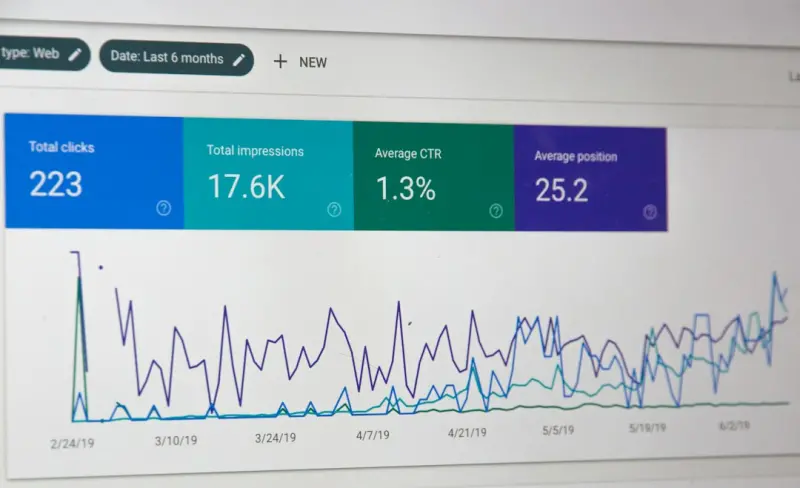
/help/path. - Click‑Through Rate (CTR) on Rich Snippets. Monitor impressions and clicks in Google Search Console for FAQ and How‑To entries.
- Support Ticket Deflection. Correlate rising article views with a dip in inbound tickets for the same issue.
- Backlink Acquisition. High‑quality articles often attract links from industry blogs, forums, and even competitor comparisons.
Run A/B tests on headline phrasing, schema variations, and content length. The data will reveal whether a concise 150‑word answer outperforms a deep‑dive 800‑word tutorial for a given query.
Future‑Proofing: AI‑Enhanced Search and Conversational Retrieval
As AI chat interfaces become mainstream, the line between traditional SEO and conversational retrieval blurs. Imagine a prospect typing a natural language query into a chatbot that surfaces a specific help article in seconds. To prepare, embed synthetic data generated QA pairs into your knowledge base, training the model to surface accurate answers.
Additionally, consider exposing a public /search endpoint that returns structured JSON, making it easy for third‑party tools, voice assistants, and internal bots to surface your documentation directly.
Practical Checklist for SEO‑Optimized SaaS Knowledge Bases
- Audit existing articles for keyword relevance and duplicate content.
- Implement FAQPage and HowTo schema on every answer‑type page.
- Ensure mobile‑first design with fast load times (Core Web Vitals < 90).
- Create a topic clustering map and link hub pages to all related articles.
- Write concise answers (first 40 words) and expand with steps and visuals.
- Set up Google Search Console and monitor rich snippet performance.
- Track ticket deflection rates and correlate with organic traffic spikes.
- Iterate based on data—optimize headlines, schema, and internal linking.
- Plan for AI integration: expose structured data and consider synthetic Q&A.
Conclusion: Turning Support Content Into a Competitive SEO Moat
When a SaaS product scales, the volume of support queries grows exponentially. By treating the knowledge base as an SEO asset, you not only reduce the burden on support teams but also capture high‑intent traffic that would otherwise land on competitor blogs. The result is a virtuous cycle: better documentation drives more organic users, who then become informed customers, generating more referrals and backlinks, further strengthening your search visibility.
In short, the knowledge base is more than a utility—it’s a strategic growth lever. Aligning content, technical SEO, and data‑driven measurement turns a simple help center into a powerful, sustainable source of organic demand.

David Moore is a freelance writer specializing in two dynamic and ever-evolving fields: gambling and the tech industry. With a keen eye for detail and a knack for unraveling complex topics, David delivers insightful and engaging content that keeps readers informed and entertained.
Related Posts

Why Semantic SEO Is the Quiet Engine Driving B2B SaaS Visibility
Semantic SEO moves beyond keywords to map user intent, structured data, and AI insights, giving B2B ... Read More
Beyond the Snippet: Harnessing SERP Real Estate for B2B SaaS Growth
This post reveals a step‑by‑step strategy for B2B SaaS companies to claim premium SERP real esta... Read More

Capturing the Micro‑Moment: SEO Tactics for the Instant Decision‑Maker in SaaS
Micro‑moments are the split‑second intent signals that decide whether a prospect stays on your s... Read More
Top Posts

AI‑Powered Emotional Analytics: Turning Data Into Storytelling Gold
Explore the power of AI‑enabled emotional analytics to craft stories that resonate, boost conversions, and keep brand authenticity at the forefront....Read More

Beyond Keywords: Intent‑Centric SEO for B2B SaaS Growth
Traditional keyword‑focused SEO is outdated. This post shows how to build an intent‑centric content map, use audio and edge technologies, and measure succes...Read More

Composable SaaS: Building Modular Platforms for Unstoppable Innovation
A deep dive into composable SaaS, exploring how modular microservices, AI, and edge computing empower businesses to innovate faster, stay resilient, and create ...Read More

Navigating Google’s AI Wave: A Human‑First Playbook for Marketers
Explore a human‑first strategy for mastering Google’s AI tools, balancing data precision with genuine storytelling to boost SEO and brand loyalty....Read More
0 Comments
Post Comment
You will need to Login or Register to comment on this post!