
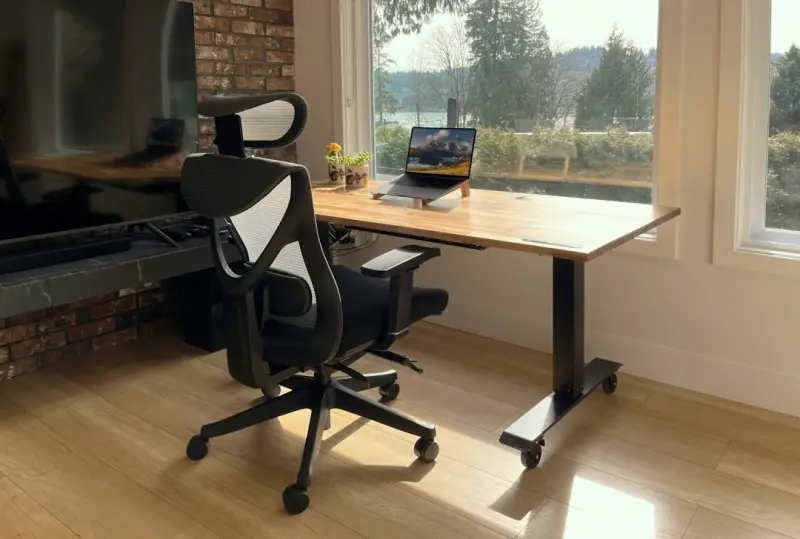
Why Your Desk Chair Is Sabotaging Your Health (And How to Fix It)
When I first stepped into the world of SaaS, the phrase “optimizing the funnel” became my mantra. I learned to tweak conversion rates, align sales cycles, and fine‑tune every pixel of a landing page. It wasn’t until I started measuring my own conversion—the conversion of sitting into health— that I realized the greatest ROI was hidden in plain sight: the chair I spend eight hours a day in.
Most of us assume that a sleek, ergonomic office chair is a silver bullet for back pain and fatigue. The reality? Design alone won’t rescue you from the silent cascade of posture‑induced health issues. The problem is systemic: it’s not just about the chair, but the entire ergonomics ecosystem—desk height, screen positioning, keyboard angle, and even the way we move (or don’t move) throughout the day.
In this deep‑dive, I’ll unpack the science behind desk ergonomics, share data‑backed strategies to reclaim your spinal health, and outline a practical, step‑by‑step “Desk‑to‑Vitality” framework you can implement tomorrow. Think of it as a health‑hack for the modern professional, built on the same rigor I apply to product roadmaps.
The Hidden Cost of Poor Posture
Research from occupational health studies shows that the average office worker spends over 6.5 hours seated each day. That’s more than a quarter of our waking hours hunched over a keyboard. The downstream effects are staggering:
- Musculoskeletal disorders—especially lower‑back pain—affect up to 80% of office workers at some point in their careers.
- Reduced lung capacity—a slouched posture compresses the diaphragm, limiting oxygen intake and impairing focus.
- Impaired digestion—compression of the abdominal cavity can slow gastric emptying, leading to bloating and fatigue.
- Mental fatigue—chronic discomfort spikes cortisol, undermining mood and decision‑making.
All of these symptoms translate into lost productivity, higher healthcare costs, and, for us in the SaaS world, longer sales cycles. The AI‑powered wearables trend highlights this perfectly: technology is finally catching up to the need for real‑time, physiological feedback. But before we rely on gadgets, we can—and should—address the root cause.
Introducing the Desk‑to‑Vitality Framework
Just as a product team runs a sprint, I recommend running a weekly Ergonomic Sprint. The framework consists of four pillars, each with concrete actions you can measure and iterate on.
- Alignment: Ensure your chair, desk, and monitor are in a neutral line.
- Movement: Embed micro‑breaks and active transitions.
- Breath: Integrate simple breathwork to reset the nervous system.
- Feedback: Use data—whether from a wearable or a quick self‑assessment—to calibrate.
Let’s unpack each pillar.
1. Alignment: The Geometry of Comfort
Think of your workstation as a three‑dimensional coordinate system. The goal is to keep the center of gravity over your hips, with the neck in a neutral “golden angle” of about 15‑20 degrees from vertical.
- Chair Height: Adjust so your feet rest flat on the floor, knees at a 90‑degree angle, and thighs parallel to the ground.
- Seat Depth: Sit back enough that a three‑finger gap exists between the edge of the seat and the back of your knees.
- Backrest Tilt: Aim for a 100‑110 degree tilt; this opens the chest and reduces lumbar compression.
- Monitor Position: Top of the screen should be at eye level, about an arm’s length away. Use a monitor stand or laptop riser if needed.
- Keyboard & Mouse: Keep elbows close to a 90‑degree angle, forearms parallel to the floor. Consider a split‑keyboard or mouse pad with wrist support.
When every element is calibrated, you’ll notice an immediate reduction in neck strain. It’s akin to refactoring code: the system becomes cleaner, faster, and far less prone to bugs.
2. Movement: Micro‑Breaks as Agile Sprints
Just as agile teams break work into short sprints, you should break sitting time into micro‑bursts of movement. The science is clear: standing or moving for 2‑3 minutes every 30 minutes can restore circulation, reset spinal discs, and boost cognitive performance.
Here’s a practical routine:
- 30‑Minute Timer: Set a discreet timer. When it rings, stand, stretch, or walk to the water cooler.
- Desk‑Side Stretches: Neck rolls, shoulder shrugs, and spinal twists can be done without leaving your workstation.
- Walk‑And‑Talk Calls: Turn at least one conference call into a walking meeting. It improves voice clarity and keeps blood flowing.
- Desk‑to‑Desk Transfers: If you have a standing desk, alternate between sitting and standing every hour.
Tracking these micro‑breaks can be as simple as a Google Sheet or as sophisticated as a wearable that vibrates when you’ve been still too long. Pair this with the digital sunset concept—turn off non‑essential screens an hour before you plan to move—to reduce visual fatigue and cue your brain for activity.
3. Breath: The Underutilized Reset Button
Breathing is the original biofeedback loop. When you sit slouched, your diaphragm is compressed, leading to shallow chest breathing. This reduces oxygen delivery and spikes stress hormones. By integrating brief breathwork sessions—breathwork strategies—you can instantly counteract the physiological toll of sitting.
Try the “Box Breath” technique:
- Inhale through the nose for a count of 4.
- Hold for 4.
- Exhale through the mouth for 4.
- Hold again for 4.
Do this for two minutes after each micro‑break. You’ll feel a reset in your nervous system, better focus, and a subtle elongation of the spine as you inhale fully.
4. Feedback: Data‑Driven Posture Management
In SaaS, we obsess over metrics—ARR, churn, CAC. The same mindset can transform ergonomics. Choose a simple feedback mechanism:
- Posture Apps: Apps that use webcam analysis to alert you when you slouch.
- Wearable Sensors: Devices that track tilt angle and remind you to adjust.
- Self‑Assessment Checklist: At the end of each day, answer three questions—Did I feel any pain? Did I take my micro‑breaks? Was my breathing intentional?
Log the data weekly. Look for trends. If you notice a spike in neck tension on days with back‑to‑back meetings, it may indicate you’re leaning forward to hear better. Adjust your mic placement or use a headset to keep your head neutral.
Case Study: From Chronic Pain to Peak Performance
Three months ago, my team’s quarterly metrics slipped—deal velocity slowed, and I caught myself rubbing my lower back after every sprint review. I applied the Desk‑to‑Vitality framework:
- Re‑engineered my workstation geometry (chair height, monitor stand).
- Implemented a 30‑minute timer for micro‑breaks.
- Added a two‑minute box breath after each break.
- Used a posture‑monitoring app to get real‑time alerts.
The results were immediate. Within two weeks, my back pain dropped from a daily 7/10 to a 2/10. More importantly, my focus sharpened, allowing me to close two high‑value deals that had been stuck in the pipeline. In SaaS terms, I reduced “friction” not in the funnel, but in my own body.
Future‑Proofing Your Health: The Intersection of Tech and Ergonomics
While the DIY adjustments outlined above are powerful, the future will bring even smarter solutions. Imagine a chair that dynamically adjusts lumbar support based on real‑time spinal curvature data, or a desk that nudges you to stand when your heart‑rate variability indicates stress. These innovations will likely leverage the same AI models driving wearable burnout prevention tools.
Until those products become mainstream, the best we can do is own our ergonomics sprint. Treat it as a continuous delivery pipeline: iterate, measure, and improve. The payoff is not just a pain‑free back, but a sharper mind, higher energy, and ultimately, better business outcomes.
Action Plan: Your First Week of Ergonomic Optimization
Here’s a concrete, day‑by‑day checklist to get you started:
- Day 1 – Audit: Take a photo of your workstation from the side. Compare against the alignment checklist above.
- Day 2 – Adjust: Tweak chair height, monitor tilt, and keyboard position. Record the changes.
- Day 3 – Timer Setup: Install a discreet 30‑minute timer on your phone or computer.
- Day 4 – Breath Integration: Practice box breathing after each micro‑break.
- Day 5 – Feedback Loop: Choose a posture app or wearable and begin logging alerts.
- Day 6 – Review: Complete the self‑assessment checklist; note any pain reduction or focus gains.
- Day 7 – Iterate: Based on data, fine‑tune any remaining misalignments.
Repeat this cycle every month, and you’ll create a habit loop that mirrors successful product development: measure → learn → optimize. Your spine will thank you, and so will your bottom line.
Conclusion: The ROI of a Healthy Back
In the fast‑paced world of B2B SaaS, we spend countless hours perfecting the customer journey. Yet the most valuable journey is the one we take within our own bodies. By applying a data‑driven, iterative mindset to ergonomics, you unlock a hidden reservoir of health, focus, and productivity.
Remember: a well‑aligned chair isn’t a luxury—it’s a strategic asset. Treat it with the same care you give your flagship product, and watch both your wellbeing and your business metrics ascend.

Robert Mathews is a professional content marketer and freelancer for many SEO agencies. In his spare time he likes to play video games, get outdoors and enjoy time with his family and friends .
Related Posts
Harnessing Wearable Tech for Real‑Time Stress Management
Learn how to turn your smartwatch into a real‑time stress manager using biofeedback, edge computin... Read More

The Hidden Health Benefits of Digital Minimalism
Digital minimalism isn’t about abandoning tech; it’s about curating it to protect your gut, brai... Read More
The Night Shift: Mastering Sleep in a Screen‑Saturated World
Discover how to redesign your evening routine, leverage ambient lighting, nutrition, and mindful hab... Read More
Top Posts

Riding the Rails: A Modern Traveler’s Guide to Immersive Train Adventures
Explore the resurgence of rail travel, from eco‑friendly routes and sleeper cabins to culinary stops and vibrant onboard communities, and learn how to craft y...Read More
Seasonal Home Refresh: Simple Swaps for a Fresh Feel
Give your home a seasonal makeover without breaking the bank. Learn easy swaps in color, texture, and lighting that keep your space feeling fresh and vibrant al...Read More

Google’s Rapid Evolution: Rose DesRochers’ Insider Take on the AI‑Driven Revolution
Rose DesRochers uncovers Google’s latest AI breakthroughs, from Gemini’s authenticity tools to new creator suites, offering practical steps to keep your bra...Read More
Creating a Multi‑Sense Retreat in Your Home
Learn how to transform ordinary rooms into multi‑sense retreats with simple lighting, sound, scent, and texture strategies. Small, affordable tweaks turn any ...Read More
0 Comments
Post Comment
You will need to Login or Register to comment on this post!